InsightVM Tagging
Discipline
UX Design & Writing
Role
1 UX Writer (Me), 2 UX Designers, 1 UI Designer, 1 UX Researcher, working under a UX manager
Timeframe
6 months
Company
Rapid7

Context
About Rapid7
Rapid7 provides a range of security and data analytics solutions to commercial customers across multiple industries, with a view to providing effective and reliable systems that protect customer data. Rapid7 has a suite of products that provide a variety of cybersecurity-based solutions depending on the maturity and budget of a customer. The Rapid7 Insight Platform collects data from across your environment, making it easy for teams to manage vulnerabilities, monitor for malicious behavior, investigate and shut down attacks, and automate your operations.
About The Project
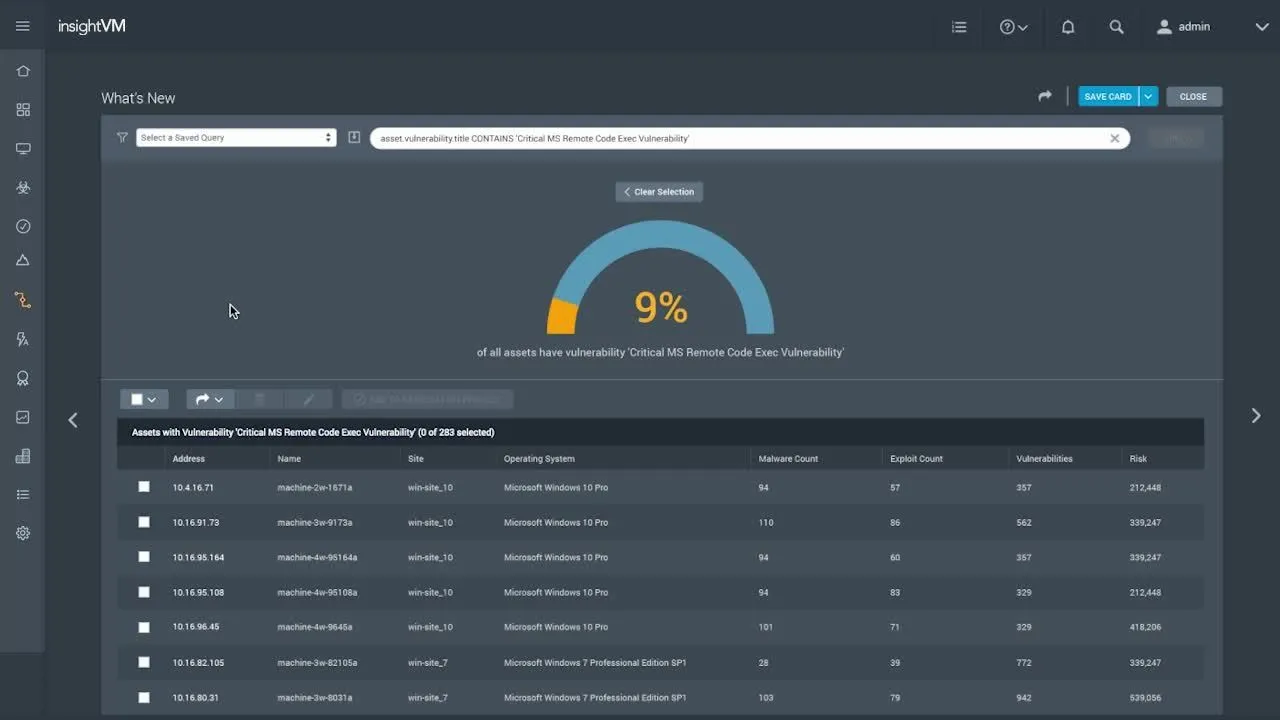
InsightVM not only provides visibility into the vulnerabilities in your modern IT environment, including local, remote, cloud, containerized, and virtual infrastructure but also clarity into how those vulnerabilities translate into business risk and which are most likely to be targeted by attackers. The tagging feature within InsightVM helps organize vulnerabilities and assets into a more cohesive ecosystem for easier tracking, accountability, and remediation.
I was assigned to work on multiple new features for InsightVM. These include Tagging, Risk Score 2.0, Policies, and Goals. This Case Study focuses on Tagging.
Overview of InsightVM
Research
Problem Statement
Rapid7’s mission to close the security achievement gap includes management of cyber risk across the entire enterprise stack from application down to operating systems and network devices. This increasingly requires that products within the Rapid7 portfolio work together seamlessly to derive meaningful reporting and metrics across the entire enterprise. While we do believe an aggregate risk picture is necessary, we haven’t solidified a complete understanding of how cybersecurity professionals and senior executives want to consume that information or what questions are currently being asked among their teams. We would like to get a better idea of how users currently organize their environment and see how we can leverage that data to inform the tagging feature.
Goal
The goal of these interview sessions is to gather a better understanding of how cybersecurity professionals currently approach problems and utilize our products. We then would like to leverage this quantitive and qualitative research to provide multi-layered guidance for maturing and advanced users so that they get the most out of the tagging feature.
Research Question
How might we best provide guidance for the tagging process so that both advanced and maturing users can benefit from the feature?
Methodology
1 on 1 interview that lasts 30 minutes to 1 hour.
Research Approach
Participant Pool
12 total participants. All cybersecurity professionals that need to secure a diverse environment with a mix of cloud and on-premise sites. 50/50 split of CISOs (Chief Information Security Officers) and those who facilitate remedial action. Mix of customers and non-customers.
During Interviews
Ask interview questions as described in the interview script.
After Interviews
Questions and comments. Craft interview summary.
Interviews
Here is an interview that we conducted with one of our participants.

Personas
Based on multiple interviews we synthesized our findings into two personas: a maturing user and an advanced user.
Overall, we found that maturing customers rely more on the guidance of the product and support in order to help them properly meet their goals.
Conversely, advanced customers know what they want and rely on tools to meet their specific needs. They take a more proactive approach to vulnerability management. They are best supported by API usage to achieve their goals and care more about easy integration and scalability than maturing customers.
Click on maturing or advanced to see readable versions of these personas.
Guidance Opportunities
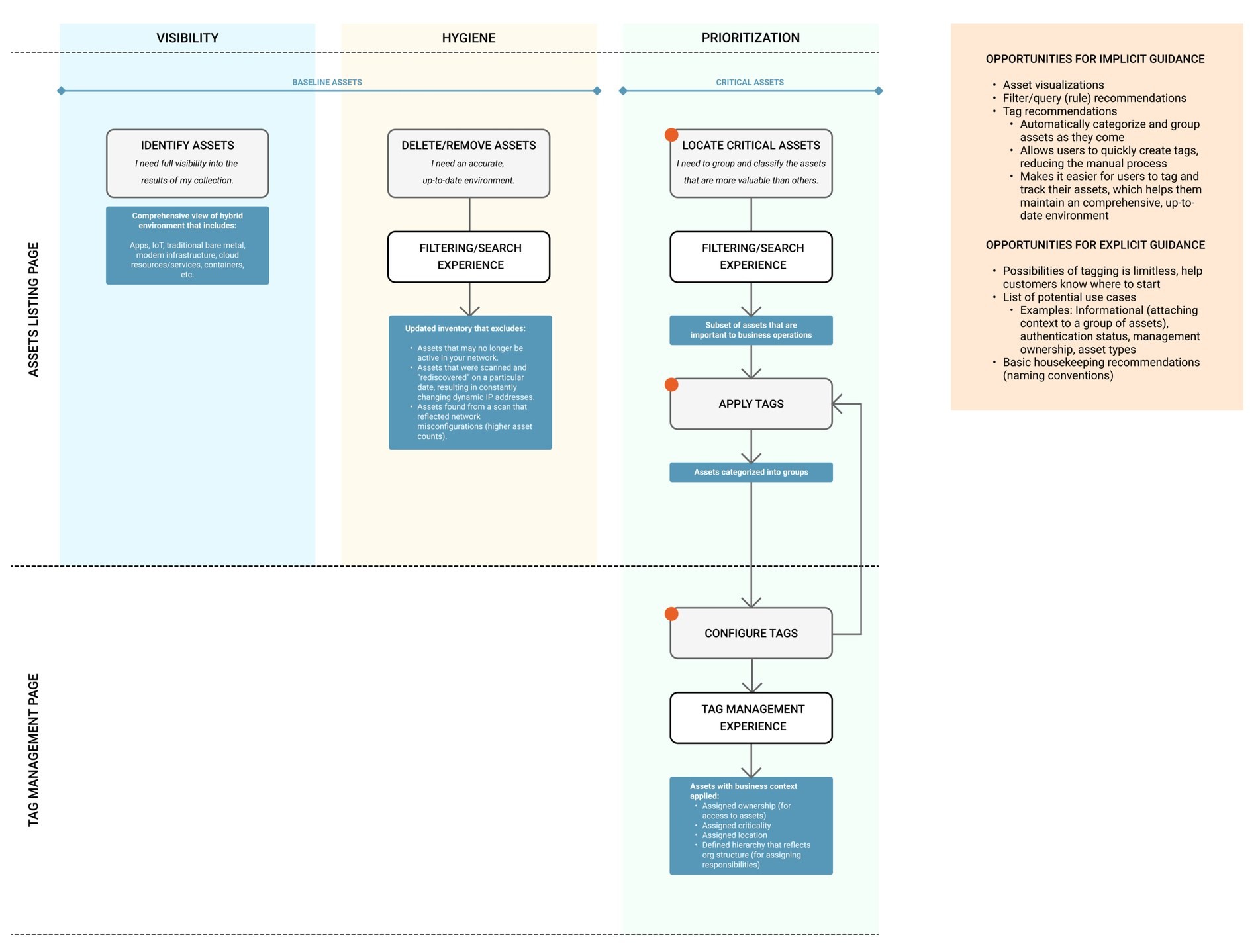
Based on the above research and personas we charted out potential implicit and explicit guidance opportunities throughout the product. Implicit guidance is inferred through UI interaction such as asset visualization, filter and query rule recommendations, and tag recommendations. Explicit guidance is achieved through tooltips and external documentation. Explicit guidance also illuminates the user on the the limitless possibilities of tagging through the illustration of potential use cases.
Implicit Guidance
• Asset visualization.
• Filter and query rule recommendation.
• Tag recommendations.
• Automatically categorize group assets.
Explicit Guidance
• Tagging possibilities are limitless.
• Help customers know where to start.
• Illustrate potential use cases for tagging.
• Basic housekeeping recommendations.
• Naming conventions.
Click on guidance chart for a readable version.
Levels of Guidance
In collaboration with UX designers, we also created a phase overview chart that explores guidance at the macro, meso, and micro levels.
At the Macro Program level users will have a surface level understanding of the program phase. They will get a preview of the topic that they are interested in and they can easily navigate from one “phase” to the next. At the Meso Action Plan level, users will receive more contextual and best practice related information. At the Micro Feature Activation level - customers will get instructed on how to perform certain actions, as well as receive guidance in the form of tool tips and smart defaults. This last type of guidance can also occur externally from the product in the form of technical documentation.
1.) Program (Macro)
• High-level definition and understanding of the program phase.
• Happens in product.
• Gives a preview and pivots users to the area/topic they care about.
• Can be navigated (from one phase to another).
2.) Action Plan (Meso)
• Contextual information.
• Best practices for this program phase (answers the why).
• Happens in product + deep dive (external long form).
• A clickable list of recommended actions.
• Smart defaults and templates.
3.) Feature Activation
• Viewable side by side.
• Instructions for how you perform this action.
• May or may not happen in product.
• Links back to best practices.
• Tips and smart defaults.

Maturing User Workflow
In collaboration with UX designers, we developed a workflow for maturing users. Starting with data collection, the user will be recommended tags. Once they understand how tagging works the user will likely start exploring on their own.
Click on phase overview chart or maturing user workflow to see readable versions of these design artifacts.

Impact of Research on UX Writing
From a UX writing perspective we faced a challenge when catering to these two unique users. We had to make our technical help articles more explicit when referencing common cybersecurity-related entities such as sites, policies, and remediation tactics for maturing users but we needed to do so in a way that it would not agitate advanced users who are already familiar with this information. Our solution was layered guidance. We hid industry terms under drop-down menus and callouts so maturing users can access the information when necessary but advanced users can skip over concepts that they are well acquainted with.
The experience of the product serves to guide users through both UI copy and overall design in a manner that helps them learn concepts and utilize tools simply through repeated use of the product. If maturing users need additional guidance they can opt into using in-product tooltips or the Pendo guide overlay that we designed.
Design
What is Tagging?
Tagging is a feature that we added to InsightVM to help customers better organize their assets. Tags are labels that can be applied to different entities either Statically or Dynamically. Static tags are manually applied by the user, while dynamic tags are applied through the use of a query.
The Tagging Experience
This presentation covers the entirety of the UX decision-making process for tagging. I wrote all the content for the designs in this presentation and consulted on the overall user experience strategy.

Content Design: Banner and Modal Support
Banners are utilized to notify users of success, failure, and loading when adding tags, scan engines, and other entities. They were designed concurrently with the tagging experience. In collaboration with the design team, I broke down each scenario in which a banner is used and created microcopy that could easily be modified for each given notification scenario.

Banner Notifications
To the left are examples of banner notifications for success and failure states. Note, we only use a “try again” button on a failure state when the probability of success is over 30%. If we know that an action is likely to fail we provide the user with some information to point them in the direction of troubleshooting steps or technical support.
Banner Guidelines
I created these banner guidelines so that designers could easily apply scenarios with various action types (deleting or editing for example) to any given banner or modal. If the following rules don’t apply to a specific action, it is considered a special use case.
Success
6 scenarios
Adding multiple
5 tags added.
Multiple to another entity
5 scan engines added to network {network name}.
Adding singular
Scan engine {scan engine name} added.
Singular to another entity
Scan engine {scan engine name} added to network {network name}.
Multiple to multiple entities
100 assets tagged.
Single to multiple entities
Asset {asset name} tagged.
Failure
7 scenarios
Adding multiple
5 tags could not be added.
Try again
Multiple to another entity
5 scan engines could not be added to network {network name}.
Try again
Adding singular
Scan engine {scan engine name} could not be added.
Try again
Singular to another entity
Scan engine {scan engine name} could not be added to network {network name}.
Try again
Multiple to multiple entities
5 assets could not be tagged.
Partial failure (application)
5 of 10 assets could not be tagged.
Partial failure (removal)
Tags could not be removed from 5 out of 10 assets.
Loading
4 scenarios
Multiple (application)
“Tagging 120 assets.” OR “Adding 10 scan engines to network {network name}.”
Singular (application)
Tagging asset {asset name}. Or, adding scan engine to network {network name}.
Multiple (removal)
Removing 2 tags from 120 assets.
Singular (removal)
Removing tag {tag name} from asset {asset name}.
Modals
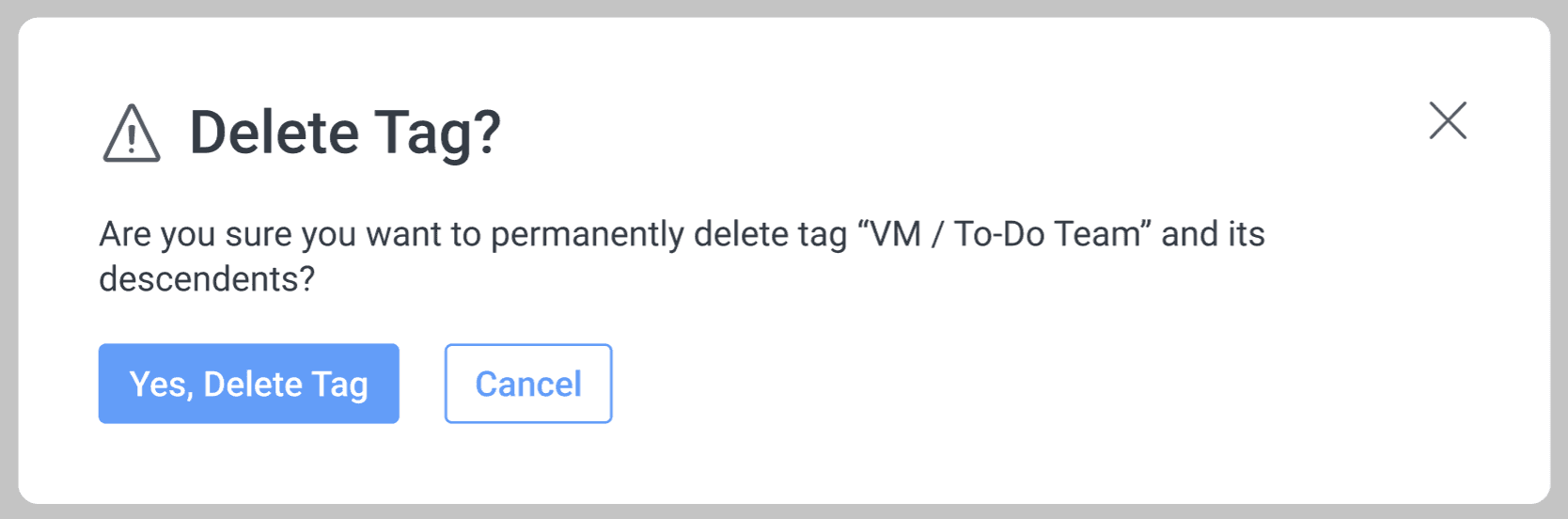
Modals are used within InsightVM for the confirmation of permanent actions. I created a standard format for how to communicate to the user that action will be irreversible.
Headline: Pose the headline as a question. Example: ‘Delete Exception?’
Sentence 1: Mention any additional effects on other entities. Example: ‘The following tags will be deleted:’ followed by the affected tag names.
Sentence 2: Restate what will be deleted. Singular: ‘Are you sure you want to permanently delete the exception {exception name}?’ Multiple: ‘Are you sure you want to permanently delete 5 exceptions?’
Button 1: ‘Yes, Delete Exception’
Button 2: ‘Cancel’
Rules
Rules are queries that the user creates to apply tags to a large number of assets simultaneously. If a rule is applied to an asset, future tags that meet the criteria will also be added.

Singular Rule Deletion
The example to the left is of a singular rule deletion.

Multiple Rule Deletion
The example to the left is of a multiple rule deletion.
Tag Removal
If the user no longer wants a tag to be associated with an asset they can remove it. Removing a tag is different than deleting it. After removing a tag it still exists and can be applied to other assets.

Remove Tag (Singular)
The example to the left is of singular tag removal.

Remove Tags (Multiple)
The example to the left is of multiple tag removal.
Tag Deletion
Deleting a tag means that it will be permanently erased. Tag deletion will affect every asset that the tag is associated with.
Tag Deletion (Singular)
The example to the left is of singular tag deletion.

Tag Deletion (Multiple)
The example to the left is of multiple tag deletion.
Technical Documentation
Technical Writing
As a member of the VRM technical writing team, I am responsible for maintaining the Rapid7 documentation website.
Below is an example of one of the articles that I wrote.
Vulnerability Exceptions ↗
Release Notes
I am responsible for drafting the release notes for the InsightVM and Metasploit products.
Conclusion
Project Conclusion
During the interview process for this project we discovered a lot about how security professionals actual interact with InsightVM. Oftentimes decision makers and the individuals who are hands on with remediation are two separate people. Cybersecurity is often one aspect of an individuals job and some IT professionals are in desperate need of guidance from the tools that they are using and from documentation.
This directly informed how we approached the Tagging feature from a design and content perspective. Having the ability to note what assets and vulnerabilities should be reviewed and why will hopefully close the gap between security officers and the engineers that work under them.
Final Results
The Tagging feature recently went into Beta access. Feedback has been positive from our customers and design partners. Surveys suggest that our customers prefer this new tagging system to the tagging system present in our other product. Using their feedback we will make alterations for a general availability release within the next couple years.
Looking towards the future
Tagging is one of many features we hope to add to InsightVM. We will likely iterate on the design and content of the tagging feature and follow-up with users to gather additional feedback. The information that we discovered in these interview sections will be vital to the development of additional features.
More Projects

© 2026 Nathan Norton